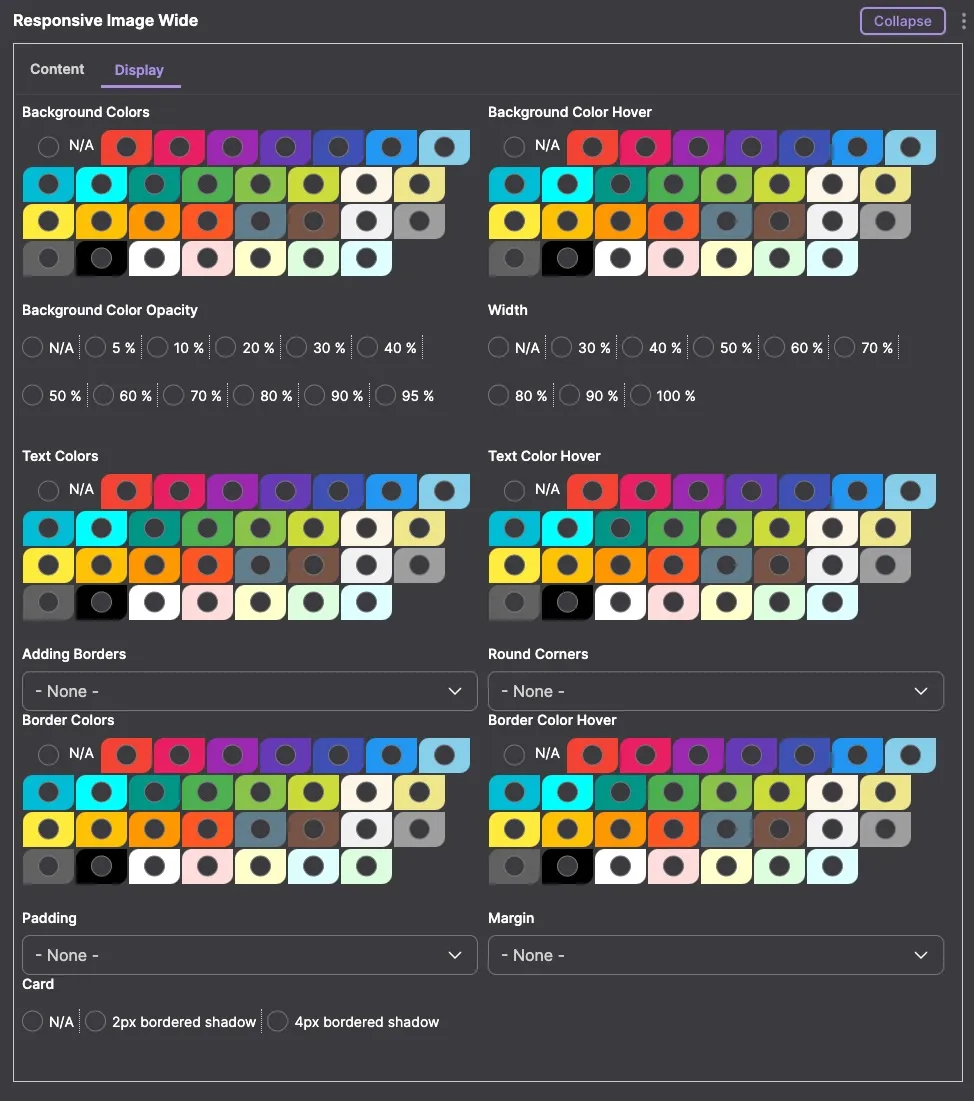
Overview of the W3CSS Image Wide Bundle
The W3CSS Image Wide bundle is a versatile and user-friendly sub-module within the Drupal W3CSS Paragraphs module. Specifically designed to enhance the presentation of images on Drupal-based websites, this bundle allows for the creation of responsive, wide (rectangle) images. It leverages Drupal's core modules such as media, media library, and responsive image to ensure seamless integration and optimal performance.
Display Tab Features
- Background Colors:
- Offers a selection of 30 different colors, enabling users to choose the ideal background that complements their image.
- Background Color Hover:
- Provides 30 color options for hover states, adding an interactive element to the image.
- Text Colors:
- Includes 30 color options for text, ensuring readability and aesthetic appeal.
- Text Color Hover:
- Comes with 30 choices for text color on hover, enhancing user engagement.
- Border Color:
- Users can select from 30 different colors for the border, adding a distinct frame to the image.
- Border Color Hover:
- Features 30 color options for border hover states, offering dynamic visual effects.
- Background Color Opacity:
- Allows adjustments from 5% to 95% (in 10% increments) after selecting a background color. This feature provides 330 color variations, adding depth and texture to the background. Note: Opacity applies only to the background color.
- Width:
- Offers a range of width options from 30% to 100%, accommodating different layout needs.
- Borders:
- Includes 11 different styles to choose from, giving a variety of framing options.
- Round Borders:
- Provides 6 styles, enabling the creation of softer, rounded edges.
- Margin:
- Offers 6 styles, aiding in the proper spacing of the image within the page layout.
- Padding:
- Comes with 8 different styles, allowing for space adjustment within the border of the image.
- Box Shadow:
- Enables adding a 2px or 4px bordered shadow, enhancing the image's prominence and depth.
Content Tab Features
- Title:
- A field for the content title, allowing users to assign a descriptive or catchy title to their image.
- Media Field:
- This field is used to upload the image. Accompanying the upload are two additional fields:
- Alternative Text: Essential for SEO and accessibility, providing a text alternative for the image.
- Title: An additional title field for the image, which can be different from the content title.
- Link Field:
- If the image is intended to be clickable, this field allows the addition of a link, directing users to a specified URL upon clicking the image.
- Image Link Title Field:
- This is an attribute for the image link, enhancing the link with a title attribute that can provide additional context or instructions when hovered over.
Conclusion
The W3CSS Image Wide bundle in the Drupal W3CSS Paragraphs module is a comprehensive tool for creating and customizing responsive wide images. Its extensive range of styling options under both the display and content tabs ensures that users can create visually appealing and functionally rich image presentations, tailored to their specific needs and the overall design of their Drupal site.